
.svg)


The Complete Guide to Data Warehouse Migration: Part 2, Technical Execution


In Part 1 of this series, we covered why organizations migrate and how to plan for it. Technical execution is where those plans meet reality.
This section focuses on executing migration at scale—translating schemas, moving data efficiently, modernizing pipelines, and validating outcomes. The goal is not just a successful cutover, but a system that is reliable from day one and easier to maintain going forward.
Schema Translation and Mapping
Schema translation is the process of converting the structural definition of your legacy data warehouse — tables, data types, constraints, indexes, and relationships — into an equivalent structure on the target platform. It is rarely a clean one-to-one mapping. Legacy warehouses built on Oracle or SQL Server use proprietary data types, platform-specific syntax, and procedural logic that does not translate directly to modern cloud based data warehouses such as Snowflake, BigQuery, or Redshift.
The database code conversion process involves extracting code directly from the source systems' database catalog, such as table definitions, views, stored procedures and functions. Once extracted, you migrate all this code to equivalent data definition languages (DDLs). This step also includes migrating data manipulation language (DML) scripts, which may be used by business analysts to build reports or dashboards.
There are several automated SQL translation tools such as Snowflake’s Migration Service, Google’s Big Query Migration Service, and Databrick’s Lakebridge to handle the bulk of conversion with manual review required for complex procedural logic.
Handling Large and Complex Tables
For large-scale tables (billions of rows), a “big bang” migration introduces significant risk. Instead, teams should adopt scalable strategies:
Parallel ingestion: Partition large tables into logical segments and load them concurrently to maximize throughput
Schema optimization: Reassess clustering, partitioning, and distribution strategies for the target system
For example, in Snowflake:
- Use native loading utilities for optimal performance and built-in error handling
- Configure separate warehouses for loading, with auto-scaling and auto-suspend enabled
- Optimize file sizes (100–250 MB) and stage organization for efficient ingestion
- Remove or purge staged files post-load to maintain performance
These optimizations ensure the new warehouse performs efficiently from day one.
Data Movement Strategies
A well-defined data architecture must specify how data flows across ingestion, staging, transformation, and consumption layers. Choosing the right movement strategy is critical:
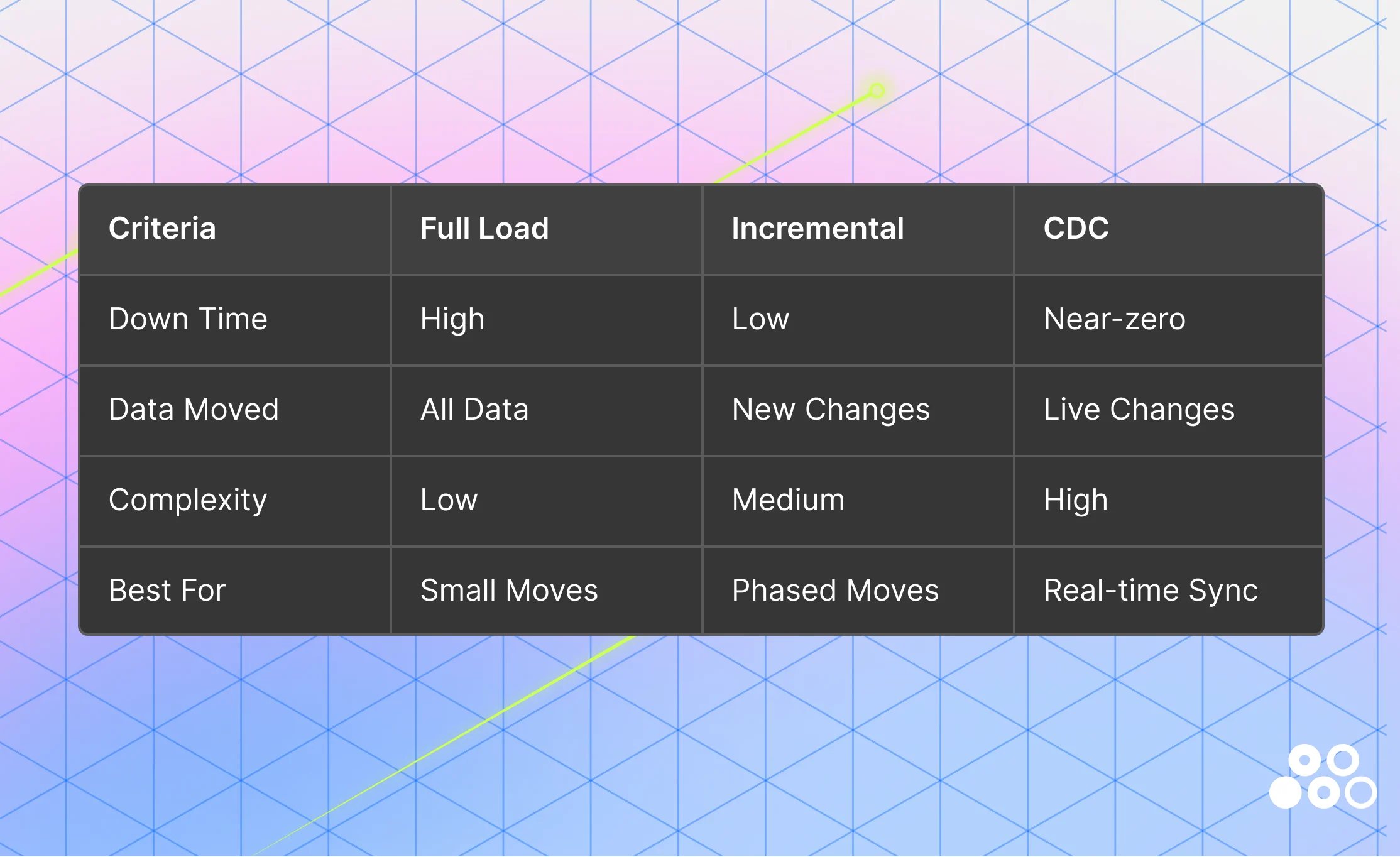
1. Full load: A full load transfers a complete snapshot of all source data to the target system in a single operation. This approach is straightforward and works well for smaller datasets or isolated systems where downtime is acceptable.
However, full loads require a data freeze window, as data must be exported from the source and imported into the target without ongoing changes. This introduces operational risk for large or business-critical systems. Additionally, careful alignment of file formats and data types is required to prevent truncation or type mismatch errors during transfer.
Example: Bulk copy operations from SQL Server into Azure SQL.
2. Incremental load: Incremental loading reduces migration overhead by transferring only new or updated records after an initial full load. This eliminates the need for extended downtime and significantly reduces data movement volume. This approach depends on reliable change tracking mechanisms—such as timestamps, watermarks, or version columns—to identify updates accurately.
Example: Transactional replication in SQL Server, where changes in the source (publisher) are continuously propagated to the target (subscriber), maintaining near real-time consistency. Incremental loading is often used as a bridge between full load and more advanced streaming approaches.
3. Change Data Capture (CDC): Change Data Capture (CDC) captures insert, update, and delete events at the source in real time, enabling continuous synchronization between legacy and target systems. This allows migration to occur with near-zero downtime, as both systems remain aligned throughout the transition.
In modern data architectures, CDC is increasingly the default—not just for efficiency, but for resilience. Instead of relying on a single high-risk cutover event, teams can validate data continuously as it flows into the target system.
CDC also plays a critical role in handling schema evolution. As source systems change—new columns, modified data types, or deprecated fields—CDC enables early detection of these changes.
However, detection alone is not enough. Teams must also enforce consistency and data quality across the pipeline.
- dbt (data build tool) provides a structured way to define schema expectations, document transformations, and run automated tests (e.g., null checks, uniqueness, referential integrity). These tests catch schema drift and data quality issues before they impact downstream analytics
- Observability platforms (such as Matia) complement this by providing real-time visibility into pipeline health, surfacing failures, anomalies, and schema changes as they occur
This combination: CDC for detection, dbt for enforcement, and observability for monitoring shifts data engineering from reactive debugging to proactive reliability.
Refactoring vs. Rebuilding: A Strategic Decision
Migration is not just a technical exercise—it’s a decision point. Teams must determine whether to preserve existing logic or rebuild it entirely.
Refactoring is the right approach when the underlying business logic is still valid but needs to be modernized. In these cases, teams can extract core transformations into modular SQL models and leverage tools like dbt for testing, documentation, and dependency management. This allows organizations to retain proven logic while improving maintainability, transparency, and scalability.
Refactoring also aligns well with modern architectural patterns. For example, Databricks’ Medallion architecture (Bronze, Silver, Gold) supports layered transformation and validation, where raw data is incrementally refined into high-quality, analytics-ready datasets. This structure makes it easier to systematically validate and improve legacy logic without rebuilding everything from scratch.
At the same time, modern ingestion platforms reduce the need to rebuild pipelines from the ground up. Rather than creating custom ingestion workflows for each source, platforms like Matia provide pre-built connectors that replicate data directly into the target warehouse. Its unified ingestion and observability layer enables real-time monitoring of pipeline health—surfacing failures, schema drift, and data quality issues as they occur, rather than after cutover. This is especially valuable in incremental or CDC-based migrations, where pipeline reliability is the primary risk.
However, refactoring is not always sufficient.
Rewriting becomes necessary when legacy logic is outdated, overly complex, or incompatible with modern systems. This is often the case when:
- Business requirements have evolved significantly
- Legacy code is tightly coupled, poorly documented, or difficult to maintain
- Platform-specific logic cannot be translated effectively
While rewriting requires more upfront effort, it provides an opportunity to eliminate technical debt, simplify transformations, and align data models with current business needs.
In practice, most successful migrations adopt a hybrid approach—refactoring where logic is still relevant, and rewriting where it no longer serves the organization. The goal is not just to move pipelines, but to improve them.
Data Validation and Testing
Validation is one of the most underestimated phases of migration—and one of the most critical. Even after data is ingested and transformations are implemented, migration projects often slow down during validation due to unexpected discrepancies. A structured validation strategy is essential.
The key stages of validation includes:
- Data Replication: Before formal validation begins, data replication establishes the foundation that all subsequent stages depend on. Replication is the process of copying and continuously synchronizing data from the source system to the target warehouse — ensuring both environments reflect the same state throughout the migration window. It enables parallel validation, allows teams to run bridging jobs and aggregate comparisons without freezing the source system, and provides a safety net for rollback if issues are discovered late in the validation process.
- Data Profiling: Profiling analyzes the source data's structure, quality, and content before migration begins. Early profiling uncovers gaps — missing identifiers, duplicate records, non-standard formats — that could derail the project later. Fixing these at the source is significantly cheaper than discovering them post-cutover.
- Unit/Transformational Testing: Unit testing validates individual components of the migration process — ensuring transformation rules are applied correctly across currency conversions, schema type changes, business logic translations, and custom calculations embedded in stored procedures or ETL logic.
- Post-Migration Validation (Reconciliation): Reconciliation verifies that the migrated data matches the source, performing 100% checks or automated reconciliation of counts and data types.
- Log Review and Data Lineage: When discrepancies occur, data lineage becomes essential. By tracing how data flows across pipelines, teams can quickly isolate root causes—whether they originate from source inconsistencies, transformation errors, or ingestion issues. dbt's built-in lineage graph covers the transformation layer; Matia extends visibility to the ingestion layer, giving teams end-to-end traceability from source system to target warehouse.
- Cutover execution: Plan the cutover down to the hour. Document every step. Assign clear ownership. Have rollback procedures ready. Stop writes to the legacy system. Run final incremental sync. Switch applications to the new platform. Monitor closely for the first 48 hours. Performance problems and data mismatches surface fast.
SQL Validation Checks
Data validation should go beyond simple row counts. A strong validation framework combines business-level metric checks, record-level comparisons, schema and precision review, and integrity testing to confirm that migrated data is both complete and trustworthy.
Aggregate Validation (Business Metrics)
Aggregate validation helps confirm that the migrated system still reflects the business accurately at a summary level. This is often the fastest way to catch major issues, because even when individual records look fine, problems such as dropped rows, duplicate records, incorrect joins, or broken filters usually show up in rolled-up totals.
In practice, teams typically compare a small set of high-value metrics across source and target systems, such as counts, revenue totals, averages, or activity volumes, segmented by dimensions that matter to the business, like region, product line, or month. The goal is not just to prove the totals match exactly, but to isolate where they diverge so investigation can begin quickly.
A useful strategy is to start with a few trusted KPIs and compare them at multiple levels of granularity. First validate the overall totals, then break them down by time period, geography, or customer segment. This layered approach makes discrepancies easier to diagnose and reduces the time spent searching for the root cause.
Record-Level Sampling
Aggregate checks are necessary, but they are not sufficient. A migration can preserve totals while still introducing record-level errors through incorrect transformations, bad mappings, or subtle logic differences. Record-level sampling helps confirm that individual rows have been moved and transformed correctly.
This type of validation works best when teams select a representative mix of records rather than relying on purely random inspection. For example, it is often helpful to review high-value transactions, edge cases, null-heavy records, recently updated data, and records that pass through especially complex transformation logic. Looking at these records side by side in the source and target systems can reveal problems that would never appear in summary totals.
A practical strategy is to define sampling rules ahead of time so validation is repeatable. Instead of checking a handful of records informally, establish a process for reviewing records from multiple categories, document the expected outcomes, and track discrepancies as defects. This turns sampling from an ad hoc QA exercise into a structured part of the migration plan.
Data Type and Precision Verification
Schema alignment matters because migrations often fail in subtle ways when fields are technically loaded but no longer behave the same. Changes in data type, scale, precision, encoding, or null handling can introduce downstream issues even if the values look roughly correct at first glance.
Validation here should focus on whether fields in the target system preserve the same meaning and usability as they had in the source. Numeric fields may be rounded or truncated, timestamps may lose time zone context, text fields may be shortened, and boolean or categorical fields may be remapped inconsistently. These are the kinds of issues that quietly break reporting logic and analytical models later.
A good strategy is to review both metadata and actual values. Start by comparing field definitions
between source and target, then test real distributions for sensitive columns such as monetary amounts, dates, IDs, and free-text fields. Pay special attention to fields used in joins, filters, calculations, or compliance reporting, since small precision changes in those areas can create outsized downstream risk.
Constraint and Referential Integrity Checks
Referential integrity checks help ensure that relationships between records remain intact after migration. Even when row counts and summary metrics look healthy, broken relationships can undermine trust in the dataset and create failures in reporting, analytics, and applications.
These checks are especially important for parent-child relationships such as customers and orders, accounts and transactions, or products and inventory records. If keys are transformed incorrectly, loaded out of order, or excluded during migration, the target system may contain orphaned or mismatched records that are difficult to detect through aggregate validation alone.
The best approach is to identify the most business-critical relationships first and validate them systematically. Start with the joins that power core reporting and workflows, then expand outward to less critical dependencies. Teams should also decide in advance how to handle expected exceptions, since not every missing relationship is necessarily an error, but every exception should be explainable and documented.
Query Optimization Techniques
Query performance often becomes a hidden challenge during migration. Even when data is successfully moved, queries written for legacy systems may perform poorly in modern cloud warehouses. This is because platforms like Snowflake operate on fundamentally different principles—columnar storage, distributed compute, and separation of storage and compute.
Optimizing queries in this environment requires a shift from traditional database tuning to focusing on how data is accessed and processed at scale.
- Filter Early and Effectively: Apply filters as early as possible to reduce the amount of data processed. Filtering on high-cardinality columns—such as dates, IDs, or partition keys—enables efficient pruning and improves query performance.
- Avoid repeatedly transforming data: Repeatedly applying transformations (e.g., string manipulation, regex) increases compute overhead. Instead, materialize transformed data once and reuse it, reducing redundant computation in downstream queries.
- Avoid repeated joins and subqueries: Frequent joins and repeated subqueries can significantly impact performance due to increased I/O and data movement. Where possible, simplify relationships or precompute results to avoid reprocessing the same data multiple times.
- Split complex queries into smaller ones: Large, monolithic queries with layered joins, subqueries, or heavy transformations can be resource-intensive. Splitting them into smaller, modular steps improves readability, maintainability, and execution efficiency.
- Optimize Table Design for Access Patterns: Query performance depends not only on SQL but also on how data is stored. Structuring tables based on common access patterns—such as filtering by date or region—enables more efficient data pruning.
- Partitioning: Partitioning divides data into physical segments based on a column (e.g., date). Queries that filter on this column scan only relevant partitions, reducing data read. It works best for low-cardinality fields and sufficiently large partitions.
- Clustering: Clustering organizes data within partitions based on selected columns. This improves performance for queries that filter or aggregate on high-cardinality fields and works well alongside partitioning to further reduce scanned data.
Stored Procedure Conversion
Before we can begin converting stored procedures to a pipeline methodology, it’s important to understand what the code in the stored procedures is accomplishing. Understanding the logic of the stored procedure allows you to build a modular framework for how the same logic should be developed in a pipeline approach.
Not every procedure should be migrated in the same way.
We can retain logic with minor changes when the logic is simple and compatible with the target platform, refactor when the business logic is still valid but the code is too procedural or monolithic or rewrite when the code is outdated, poorly documented, heavily cursor-based, or depends on platform-specific syntax
During data migration, when dealing with stored procedures that have a lot of data transformation logic, making use of temporary tables inside the stored procedures could be useful as an intermittent staging between databases. When you have to pull data from one database, transform or filter it, and then use it to insert into the final destination in another DB.
Example
Suppose a legacy stored procedure:
- reads
orders_raw - trims and standardizes text fields
- joins
customers - calculates revenue category
- inserts results into
sales_summary
Instead of migrating that one procedure as-is, you would usually do this:
stg_orders→ cleaned raw order datastg_customers→ cleaned customer dataint_orders_enriched→ joined and standardized intermediate tablefct_sales_summary→ final destination table
So the logic is preserved, but the implementation becomes modular and easier to test.
Standardize function conversion
- Simple scalar functions can often be rewritten directly in the destination SQL dialect
- Reusable business rules should be centralized so they are not duplicated across models
- Complex functions may need to move into Python, Spark, or another processing layer if the destination platform does not support them well
ETL/ELT Pipeline Migration
Migrating data pipelines is not just about recreating existing workflows—it’s about rethinking how data is ingested, transformed, and delivered in a modern architecture.
Traditional ETL pipelines perform heavy transformations before loading data into the warehouse. While this worked for legacy systems, it introduces rigidity, limits scalability, and increases operational overhead. Modern data platforms shift toward an ELT approach, where raw data is first loaded into the warehouse and transformations are applied afterward using scalable compute.
This shift simplifies pipeline design and allows teams to:
- Retain raw data for reprocessing and auditability
- Iterate on transformations without re-ingesting data
- Leverage warehouse-native performance for large-scale processing
Platforms like Matia streamline this process by providing:
- Pre-built connectors to ingest data from multiple source systems directly into the target warehouse
- Support for incremental and CDC-based ingestion, reducing data movement and enabling near real-time updates
- A unified layer for ingestion and observability, allowing teams to monitor pipeline health, schema changes, and data quality issues in real time
This reduces the need to rebuild pipelines from scratch and accelerates migration timelines.
Example Architecture: Matia → Snowflake → dbt
A modern pipeline-based migration can be implemented using a layered architecture that separates ingestion, storage, and transformation:
- Ingestion Layer (Matia): Matia connects to source systems (e.g., SQL Server, APIs, SaaS tools) and replicates data into Snowflake using incremental or CDC-based ingestion.
- Handles schema changes and data updates in near real time
- Eliminates the need for custom ingestion scripts
- Provides observability into pipeline health, failures, and data freshness
- Storage Layer (Snowflake): Raw data is landed into Snowflake staging tables (often in a “Bronze” layer).
- Stores data in its original format for traceability and reprocessing
- Scales compute independently for ingestion and querying
- Serves as the central data platform for downstream transformations
- Transformation Layer (dbt): dbt models transform raw data into clean, analytics-ready datasets
- Staging models standardize and clean raw data
- Intermediate models apply joins, business logic, and enrichment
- Final models (Gold layer) produce reporting-ready tables
Version Control and CI/CD
Data migration involves far more than moving tables. Transformation logic, pipeline definitions, schema changes, and orchestration code are all subject to change throughout the migration window — and without version control and automated deployment practices, those changes become a source of risk rather than progress. Version control should cover all data pipeline artifacts — not just application code, but SQL scripts, pipeline definitions, infrastructure-as-code, and database schema migration scripts. Treating the data warehouse schema as code, tracked through DDL scripts, is the foundation of reliable CI/CD for data teams.
Git Branch Strategy for Migration Projects
A practical Git strategy for data migration follows a four-branch model: **main** represents the production-ready state of the warehouse — only code that has passed QA and peer review merges here. **develop** serves as the integration branch for new models, dependency testing, and schema consistency validation. **feature branches** isolate individual models, macros, or transformation changes — for example, `feature/add_customer_dim` or `feature/update_sales_funnel_kpi` — and merge into develop via pull request once tested. **hotfix branches** are cut directly from main to patch critical production issues without waiting for the full release cycle.
Schema changes should be tracked explicitly. dbt's `schema.yml` tracks schema modifications and version-controls the schema history — combined with Git diffs and dbt docs, this provides full transparency over how the warehouse structure has evolved throughout the migration.
CI/CD with GitHub Actions and dbt
dbt integrates with GitHub Actions, GitLab CI, and Apache Airflow to validate and deploy data pipelines through version control — making it easier for teams to collaborate on shared models, review changes, and enforce testing before deployment. Atlan
A standard CI pipeline triggers dbt tests on every pull request — building models, validating lineage, and running data quality checks before any change is merged. Here is a basic GitHub Actions configuration for a Snowflake-backed dbt project:
name: dbt CI
on:
  pull_request:
    branches: [develop]
jobs:
  build:
    runs-on: ubuntu-latest
    steps:
      - uses: actions/checkout@v3
      - uses: actions/setup-python@v4
        with:
          python-version: '3.11'
      - run: pip install dbt-snowflake
      - run: dbt deps && dbt build --target dev
For orchestration, Apache Airflow schedules and monitors dbt runs in production — triggering model builds on a defined cadence, surfacing failures, and managing dependencies between pipeline stages. A basic Airflow DAG that runs dbt on a schedule looks like this:
from airflow import DAG
from airflow.operators.bash import BashOperator
from datetime import datetime

with DAG(
    dag_id="dbt_migration_pipeline",
    schedule_interval="@daily",
    start_date=datetime(2025, 1, 1),
    catchup=False
) as dag:

    dbt_run = BashOperator(
        task_id="dbt_run",
        bash_command="dbt run --target prod"
    )

    dbt_test = BashOperator(
        task_id="dbt_test",
        bash_command="dbt test --target prod"
    )

    dbt_run >> dbt_test
This ensures models run before tests, failures are surfaced immediately, and no untested code reaches production consumers.
Use separate environments — development, staging, and production — to isolate deployments. Development and staging should mirror production as closely as possible. Use environment-specific dbt profiles and variables rather than code forks to maintain consistency without duplicating the codebase.
Security, Access, and Governance
Data security, compliance, and governance are essential for managing sensitive information across its lifecycle — security protects data from unauthorized access and breaches, compliance ensures adherence to regulations, and governance aligns data practices with business goals ensuring quality, consistency, and regulatory compliance.
Authentication and Access During Migration
Access management during migration is one of the most overlooked security risks in the entire programme. Credentials are shared across teams, temporary access is granted for cutover tasks, and new tooling introduces new authentication surfaces — all at the same time.
The core authentication controls that must be in place before migration begins:
- Multi-Factor Authentication (MFA) — enforce for all accounts accessing migration tooling, source systems, and target environments throughout the migration window, not just in production
- OAuth 2.0 and SSO — use federated login via an existing identity provider rather than managing separate credentials for each migration tool, ingestion platform, and target warehouse. This is particularly important when the migration stack spans multiple platforms simultaneously
- Service accounts over individual credentials — ingestion pipelines should authenticate via dedicated service accounts with scoped permissions, not individual engineer credentials that change or expire mid-migration
- Temporary access with defined revocation — engineers who need elevated access for cutover tasks should be granted it via temporary roles with an explicit revocation date. Permission sprawl from migration projects is one of the most common post-migration security audit findings
Data Governance and Compliance
Data governance during migration spans the full data lifecycle—from collection to retention and disposal—and must comply with regulations such as **GDPR, CCPA, HIPAA**. Because migration often involves sensitive information, it introduces additional compliance risk. Without proper controls, organizations can face regulatory violations, unauthorized access, or data loss. Embedding governance and security directly into the migration process is therefore critical.
Key tactics engineering teams should implement or evaluate in migration solutions include:
- Encryption in transit and at rest to protect data as it moves between systems and while stored in target environments
- Role-Based Access Control (RBAC) to define who can access or modify data and pipelines based on their role
- Fine-grained access controls (row- and column-level) to limit how much data a user can see, even when access is granted
- Audit trails and logging to track access, changes, and permission updates for compliance and incident investigation
Matia centralizes access management across the entire data platform, enabling consistent and scalable control across systems.
Key capabilities include:
- Centralized RBAC: Define roles once and apply them across integrations, observability, and catalog layers—eliminating fragmented access management
- Fine-Grained Access Governance: Ensures sensitive data is only accessible where necessary, supporting secure collaboration across teams working on migration and AI workflows.
- Audit Logs and Activity Tracking: Captures user access, role assignments, and permission changes over time. Provides a complete history of who accessed or modified data workflows—critical for SOC 2 and internal audits.
- API-driven access control: Automate user provisioning and integrate with existing identity management systems
- Centralized Access Visibility: Offers a single view of platform-level permissions across integrations, observability, and catalog layers, eliminating fragmented access tracking.
By combining cataloging, access control, and auditability, Matia ensures governance is not a separate layer but an integrated part of the migration process—keeping data secure, compliant, and fully traceable as it moves across systems.
Successful execution is not about speed—it’s about control. Teams that invest in structured validation, modular pipelines, and modern ingestion strategies reduce risk and avoid costly rework. By the end of execution, the system should not only be live, but stable, testable, and ready for production workloads.
In Part 3 of this series, we move beyond execution into what comes next: the operational challenges of running dual systems, avoiding tool sprawl, and optimizing performance, cost, and reliability post-migration.

.png)





.svg)


