
.svg)


What is Role-Based Access Control? A Modern Guide for Data Teams


.webp)
Data teams are drowning in access requests. Every new hire needs permissions configured across Snowflake, dbt, Looker, Airflow, and half a dozen other tools. Every departing employee leaves a trail of orphaned credentials. Every compliance audit becomes an archaeological dig through fragmented permission systems.
The pressure is mounting. Gartner predicts that 80% of data and analytics governance initiatives will fail by 2027, primarily because they take rigid, centralized approaches that slow down business outcomes. Role-Based Access Control offers a different path: structured enough for security and compliance, flexible enough to enable data democratization.
Ask any data engineer about their least favorite part of the job, and "managing access requests" consistently ranks near the top. It's tedious, error-prone, and pulls talented engineers away from work that actually moves the business forward. RBAC transforms data access from an ongoing crisis into a manageable system.
This guide walks through everything data professionals need to know about role-based access control: how RBAC works, why it matters for modern data teams, and how to implement RBAC effectively across your data stack.
What is Role-Based Access Control (RBAC)?
Role-Based Access Control is a method of managing access to resources by assigning permissions to roles rather than individual users. Instead of granting Sarah from Marketing direct access to the customer database, you assign her the "Marketing Analyst" role, which comes with predefined permissions to access specific datasets, dashboards, and tools.
RBAC fundamentally changes how data teams think about access control. Rather than asking "what should Sarah be able to access?" you ask "what should a Marketing Analyst be able to access?" This shift from individual to role-based thinking is what makes RBAC scalable.
The Core Problem RBAC Solves for Data Teams
Modern data teams face an impossible triangle: they need to democratize data access for business users, maintain rigorous security controls, and comply with an expanding web of regulations, all while data volumes and tooling complexity explode exponentially.
Without proper access control through RBAC, data teams encounter:
Permission sprawl across platforms: Your data warehouse has one permission system, your BI tool has another, your data catalog has a third, and your orchestration platform has a fourth. A single analyst might need access configured in six different places. Managing these permissions individually becomes unsustainable as teams grow.
Compliance nightmares: When auditors ask "who has access to customer PII?" you spend days mapping permissions across systems, only to discover ex-employees still have access to production databases. Role-based access control creates the audit trails compliance requires.
Operational bottlenecks: Data engineers spend significant time handling access requests instead of building data products. New hires wait days or weeks to access the tools they need. RBAC implementation reduces these bottlenecks by standardizing the access provisioning process.
Security vulnerabilities: Developers have production access they don't need. Analysts can accidentally DROP TABLE in critical databases. Former contractors retain access months after projects end. RBAC enforces the principle of least privilege systematically.
Role-based access control addresses these challenges by creating a structured, repeatable system for managing data access at scale.
How RBAC Works: The Framework
RBAC operates on a simple four-layer model:
Users are assigned to Roles, which are granted Permissions to access Resources.
Let's break down role-based access control with a practical example. When Jessica joins your company as a Marketing Analyst:
- Jessica (the User) is assigned to the "Data Analyst" role
- The "Data Analyst" Role has been pre-configured with specific permissions
- Those Permissions include read access to marketing schemas, query access to customer analytics tables, and view access to marketing dashboards
- These permissions apply to specific Resources: your Snowflake marketing database, your Looker marketing folder, and your Matia connectors for ad platforms
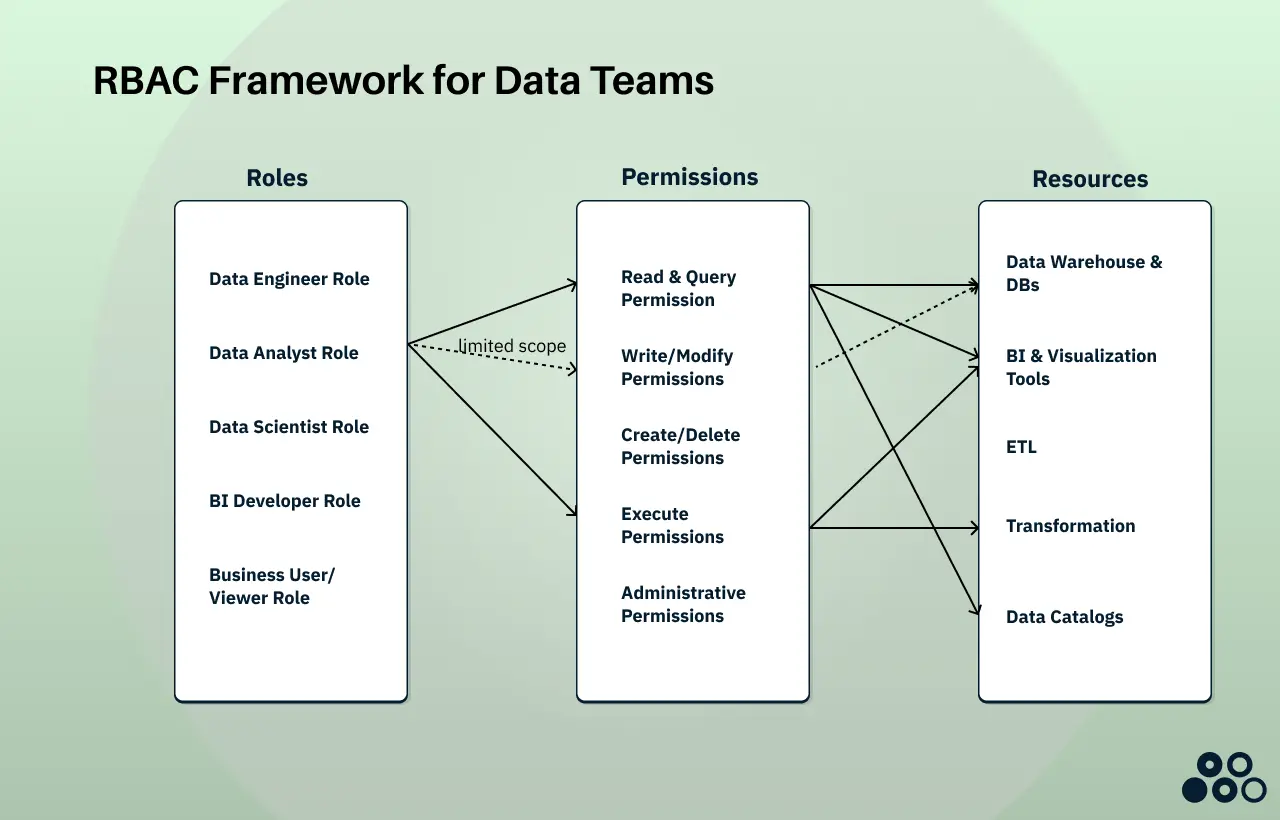
In the diagram above, you can see the RBAC configuration for the Data Analyst Role. Jessica has read & query permissions, execute permissions, and limited write/modify permissions for workspace schemas.
When Jessica logs into your data stack, her user account is automatically recognized as having the Data Analyst Role. This role grants her three types of permissions, each connected to specific resources:
Read & Query Permissions give Jessica access to your Snowflake marketing database where she can SELECT data from customer analytics tables, as well as view and interact with marketing dashboards in Looker. She can also browse your data catalog to discover what marketing datasets are available and understand their definitions.
Execute Permissions allow Jessica to run pre-built dbt models that transform raw marketing data into analysis-ready tables. She can also trigger scheduled reports and refresh dashboards when needed, without having the ability to modify the underlying transformation logic.
Write/Modify Permissions are carefully scoped to only her personal workspace schema. This means Jessica can create temporary tables for her analysis work, save query results, and experiment freely without any risk of accidentally modifying production marketing data or impacting other users.
Notice what Jessica cannot do: she has no access to ETL tools like Matia (she doesn't manage data ingestion), she cannot modify production tables or delete data, and she has no administrative permissions to change configurations or manage other users.
This is the principle of least privilege in action. Jessica has exactly the access she needs to perform her job as a Data Analyst, nothing more, nothing less. . If she transitions to become a Data Scientist, you simply reassign her from the Data Analyst role to the Data Scientist role. Instantly, her access automatically expands to include feature stores for model training, ML platforms and notebooks, and experimentation schemas where she can build and test models, all without manually reconfiguring permissions across multiple systems.
RBAC vs. Other Access Control Models
Role-based access control isn't the only approach to access management. Understanding the alternatives clarifies why RBAC has become the standard for data teams implementing access control.
For most data teams, RBAC offers the right balance: more structured than DAC, more flexible than MAC, and more manageable than ABAC. Role-based access control provides the foundation that teams can build on as their access control needs mature.
Key Components of RBAC for Data Teams
Understanding role-based access control requires clarity on its four core components and how they work together in data environments.
Users and Roles in RBAC
In data contexts, RBAC users include data engineers, analytics engineers, data analysts, data scientists, BI developers, business users, data stewards, and executives. Each requires different access levels across your data infrastructure.
Roles are collections of permissions that align with job functions. Well-designed RBAC roles reflect how your organization actually works:
Data Engineer Role - Full access to development environments, read access to production, ability to create and modify pipelines, access to orchestration tools like Airflow
Data Analyst Role - Read access to curated analytics databases, query access to reporting tables, view and edit access to BI tools, no access to raw production data or PII without anonymization
Data Scientist Role - Read access to feature stores and modeling datasets, write access to experimentation schemas, access to ML platforms and notebooks
BI Developer Role - Read access to analytics databases, full access to BI development environments, ability to publish dashboards and reports
Business User/Viewer Role - View-only access to published dashboards, access to self-service BI tools with pre-built templates, no direct database access
The key to effective RBAC implementation is creating roles that are broad enough to avoid role explosion but specific enough to maintain least-privilege principles. Start with 5 to 10 core roles when implementing role-based access control, then expand as needed.
Permissions and Resources in RBAC
Permissions define what actions roles can perform in your RBAC system. In data environments, role-based access control permissions include:
Read/Query Permissions - SELECT statements on tables and views, ability to preview data, access to metadata
Write/Modify Permissions - INSERT, UPDATE, DELETE operations, ability to modify existing objects
Create/Delete Permissions - CREATE TABLE, DROP TABLE, schema modifications
Execute Permissions - Run stored procedures, trigger pipelines and workflows, execute dbt models
Administrative Permissions - Alter system configurations, manage users and roles, access audit logs
The principle of least privilege in RBAC dictates that roles should have only the minimum permissions required to perform their functions.
Resources in data environments that role-based access control must protect include:
Data Warehouse Objects - Databases, schemas, tables, views, stored procedures
BI and Visualization Tools - Dashboards, reports, workbooks, published content
Data Pipelines - ETL Platforms, DAGs and workflows, orchestration schedules
Data Catalogs - Metadata entries, data lineage graphs, data quality rules
Comprehensive RBAC must span all these resource types across your entire data stack.
Why Data Teams Need RBAC
The case for role-based access control extends beyond theoretical security benefits. For data teams, RBAC addresses concrete, costly operational problems.
Security and Compliance Through RBAC
Prevent Unauthorized Access: Role-based access control ensures that users can only access data appropriate for their role. A customer service representative doesn't need access to financial forecasting models. A marketing analyst doesn't need personal health information. RBAC enforces these boundaries systematically.
Audit Trails and Accountability: When every user's permissions are defined through roles in your RBAC system, auditing becomes straightforward. Instead of tracking thousands of individual permission grants, you audit role definitions and role assignments. When something goes wrong, RBAC lets you quickly identify who had access and when.
Regulatory Compliance: Modern data regulations require demonstrable access controls that RBAC provides. GDPR mandates data minimization and documented access to personal data. SOC 2 requires access control policies and regular access reviews. HIPAA demands audit logs and role-based restrictions for protected health information. CCPA requires businesses to track and document data access.
Without role-based access control, proving compliance means manually documenting individual permissions across platforms, a nearly impossible task at scale. With RBAC, your role definitions become your compliance documentation.
Operational Efficiency With RBAC
Reduce Permission Management Overhead: Without role-based access control, onboarding requires configuring access in Snowflake, Databricks, Looker, Tableau, Mode, dbt Cloud, Matia, and potentially a dozen other tools, each with different interfaces. With RBAC implementation, onboarding means assigning a role, and downstream permissions flow automatically.
Faster Onboarding and Offboarding: New hires become productive on day one instead of day five with proper RBAC. When employees leave, one role revocation in your role-based access control system ensures they lose access everywhere instantly, critical for security and compliance.
Self-Service Within Guardrails: Properly implemented RBAC enables data democratization without chaos. Business users can access pre-approved datasets and dashboards without ticket queues. Role-based access control shifts data teams from gatekeepers to enablers.
Reduced Bottlenecks: Without role-based access control, data engineering teams report spending 15 to 25% of their time on access requests. RBAC redirects that effort toward value-creating work.
Governance and Data Quality
Clear Data Ownership: Role-based access control naturally encourages defining data domains and ownership. When creating RBAC roles for the Finance team, you must decide which tables belong to Finance, forcing clarity about data stewardship.
Controlled Modifications: By limiting who can write to production tables through RBAC, you prevent accidental data corruption. Junior analysts can't accidentally DROP TABLE customers. Write permissions in role-based access control become deliberate, documented decisions.
Environment Separation: RBAC makes it possible to enforce proper development, staging, and production separation. Developers have full access to dev environments where they can experiment freely, limited access to staging for testing, and restricted read-only access to production through their assigned roles.
The Cost of Operating Without RBAC
Organizations that defer implementing role-based access control face escalating costs. Each new tool adds new permissions. Each new employee multiplies complexity. Within two years, even small teams lose track of who has access to what without RBAC.
When official data access is too slow without proper RBAC, business users create workarounds: downloading data to Excel, maintaining their own databases, building unauthorized integrations. These shadow data systems are invisible to security teams and governance frameworks.
The gap between your actual access patterns and what you can document to auditors widens without role-based access control. Failed audits lead to remediation costs, delayed certifications, and in severe cases, regulatory fines.
Eventually, the combination of permission sprawl, inadequate auditing, and former employees retaining access leads to a security breach. Role-based access control prevents these scenarios by creating systematic access management from the start.
RBAC in Modern Data Stacks
The modern data stack creates unique challenges for RBAC implementation. Unlike traditional applications where a single database might handle all access control, data teams orchestrate dozens of specialized tools, each with its own permission system.
The Multi-Platform RBAC Challenge
A typical data team operates across multiple platforms where role-based access control must be configured:
Data Platforms like Snowflake, BigQuery, Databricks, each with native RBAC but different implementations
Transformation Layer like dbt with its own project and environment permissions
BI and Analytics like Tableau, Looker, Power BI, each maintaining its own permission model
Orchestration like Airflow, Prefect managing workflow execution with separate user management
Data Observability tools including Matia as well as other non-native data tools configured to help understand quality
Data Catalogs such as Matia with metadata access controls that need RBAC integration
The fundamental problem: granting a marketing analyst access to campaign data requires configuring permissions in at least five different systems. Maintaining consistency across these systems, ensuring that the "Marketing Analyst" role means the same thing everywhere in your role-based access control implementation, becomes a significant operational challenge.
Common RBAC Patterns for Data Teams
Successful data teams typically organize role-based access control along three dimensions:
Environment-Based RBAC: Roles like dev_full_access, staging_read_write, and prod_read_only enforce proper development practices and protect production data through role-based access control.
Domain-Based RBAC: Roles like finance_analyst, marketing_analyst, and product_analyst align with organizational structure and data ownership models.
Function-Based RBAC: Roles like data_engineer, analytics_engineer, and data_analyst align with job functions and career ladders.
Many teams combine these approaches in hybrid RBAC models. For example, marketing_data_analyst_prod gives an analyst production read access specifically to marketing domains. The hybrid approach offers flexibility but requires careful planning to avoid role explosion in your role-based access control system.
Key RBAC Implementation Challenges
Role Explosion: The most common RBAC pitfall is creating too many narrowly-defined roles. Teams start with sensible role-based access control categories but gradually accumulate hundreds of overly specific roles. This defeats the purpose of RBAC.
Cross-Platform Consistency: Maintaining equivalent role definitions across platforms in your RBAC system requires coordination. Each platform has different permission granularity, making perfect RBAC alignment challenging.
Dynamic Access Needs: Real-world data access patterns don't always fit neatly into static role-based access control definitions. A data scientist needs temporary access to customer data for a specific project. Traditional RBAC handles this through temporary role assignments that require manual tracking.
Getting Started with RBAC
Implementing role-based access control is a journey. The key to successful RBAC is starting with a solid foundation and expanding systematically.
Assess Your Current State
Before designing roles for your role-based access control system:
Inventory Your Data Assets: Document every system where data access needs RBAC management. Include your data warehouse, BI tools, orchestration, notebooks, data quality tools, and catalogs that need role-based access control.
Document Existing Access Patterns: Who currently accesses what? Query audit logs to understand how people actually work with data. This informs RBAC role design.
Identify Sensitive Data: Flag datasets that require special handling in your RBAC system: PII, financial data, health information. These need separate role considerations in your role-based access control implementation.
Map Compliance Requirements: List which regulations apply and what access controls they mandate. Your RBAC design must accommodate these requirements from the start.
Define Your RBAC Role Hierarchy
Base RBAC Roles on Organizational Reality: Align your initial roles with how your organization actually works. If you have distinct Data Engineering, Analytics Engineering, and Data Science teams, those translate naturally to RBAC roles.
Start With 5 to 10 Core RBAC Roles: Begin with broad categories when implementing role-based access control:
- Viewer (read-only, no direct database access)
- Analyst (read access to curated data, BI tool usage)
- Analytics Engineer (dbt development, transformation logic)
- Data Engineer (pipeline development and management)
- Admin (full access for senior team members)
Document Each RBAC Role Clearly: For every role in your role-based access control system, document the purpose, intended users, key permissions, restrictions, and approval process. This becomes your RBAC governance and audit trail.
Establish Core RBAC Principles
Least Privilege: Grant only the minimum permissions required for job functions in your role-based access control system. If analysts only need to SELECT data, they shouldn't have UPDATE or DELETE permissions.
Separation of Duties: No single RBAC role should have end-to-end control of sensitive workflows. This is a fundamental principle of effective role-based access control.
Time-Bound Access: When granting elevated or sensitive permissions, default to temporary access with explicit expiration. Role-based access control should support temporary role assignments for project-based work.
Audit Everything: Log all role assignments, role changes, and permission modifications in your RBAC system. This audit trail is essential for security and compliance.
RBAC Implementation Roadmap
Phase 1: Critical Systems (Weeks 1 to 4) - Start your RBAC implementation with your data warehouse and most sensitive datasets. Implement role-based access control for PII and regulated information. Focus on core infrastructure: SSO integration, role definition process, and audit logging.
Phase 2: Expand RBAC (Weeks 5 to 12) - Extend role-based access control to your BI tools, orchestration platform, and other critical systems. Ensure RBAC role definitions remain consistent across platforms.
Phase 3: Automate (Weeks 13+) - Build automation for onboarding and offboarding in your role-based access control system. Integrate RBAC with HR systems. Establish regular access review cycles and measure success metrics.
Tools for RBAC Implementation
Your role-based access control implementation involves multiple layers:
Identity Provider and SSO: Azure AD, Okta, or OneLogin manage user identities. Most modern data tools support integration with these providers, enabling centralized user management for RBAC.
Native Warehouse RBAC: Snowflake, BigQuery, Databricks include built-in role-based access control capabilities. These are the foundation of your data access control strategy.
BI Tool Permissions: Tableau, Looker, Power BI each have permission models that complement warehouse RBAC and must be configured consistently.
Infrastructure as Code: Manage role definitions as code using Terraform or dbt. This enables version control and automated deployment of role changes in your role-based access control system.
Purpose-Built Data Access Platforms: Solutions like Matia orchestrate RBAC across your entire data stack. Rather than manually configuring equivalent roles in six different tools, you define role-based access control once, which propagates appropriate permissions everywhere.
RBAC Best Practices
Successfully maintaining role-based access control requires ongoing discipline:
Conduct Regular Access Reviews: Schedule quarterly reviews where managers certify their team members' RBAC role assignments. Automate these reviews where possible.
Document Comprehensively: Treat RBAC role documentation as a living system. When roles change in your role-based access control system, update documentation immediately.
Automate Provisioning: Integrate your RBAC system with HR workflows so new hire events trigger role assignments and departure events trigger immediate revocation.
Monitor Usage Patterns: Track how roles are actually used in your role-based access control system. Remove unused permissions to maintain least privilege.
Balance Security with Usability: Overly restrictive RBAC creates user frustration. Find the equilibrium where security is maintained but legitimate work isn't blocked by role-based access control.
Foster Collaboration: Role-based access control isn't just a data team responsibility. Partner with Security, IT, Legal, and business stakeholders for effective RBAC design.
Conclusion
Role-Based Access Control transforms data access from an operational burden into a manageable system. By organizing permissions around roles rather than individuals, RBAC enables data teams to scale securely, meet compliance requirements, and empower data democratization without sacrificing governance.
The journey to effective role-based access control begins with foundational steps: assess your current access patterns, define core RBAC roles aligned with organizational structure, implement role-based access control in critical systems first, and expand systematically. Maintain discipline around role granularity, document everything for audit purposes, and automate wherever possible.
For data teams just beginning, start simple with your role-based access control: implement basic RBAC roles in your data warehouse, extend to your BI tool, and establish processes that support future sophistication. For teams with RBAC in place but facing scale challenges, purpose-built data access platforms can unify fragmented permission systems and add the intelligence layer that traditional role-based access control lacks.
The time your team spends managing access requests can be redirected toward extracting insights and building data products. The compliance gaps keeping you up at night can be solved with the audit trails and documented controls that role-based access control provides.
The path from permission chaos to structured access control through RBAC is clear. The question is whether you'll implement role-based access control proactively or reactively after the next security incident or failed audit.

.png)






.svg)


