
.svg)


Building a Hybrid Data Pipeline: Technical Takeaways from PayIt's Architecture Webinar


.webp)
In a recent webinar, Mitchell Cooper walked through PayIt's data architecture and the technical decisions behind their hybrid pipeline approach. PayIt is a payment platform that partners with city, municipal, state, and county governments to modernize payment systems, from DMV license renewals to outdoor permits.
Following their acquisition of S3 (now PayIt Outdoors), the team needed to integrate new data sources and modernize their approach. The session offered practical insights into their architecture, implementation details, and the results they've seen.
Here are the key technical takeaways.
The Architecture: A Two-System Approach
Mitchell shared PayIt's deliberately split data pipeline architecture that separates internal platform data from third-party integrations. The architecture diagram from the webinar shows how they've organized data flows:
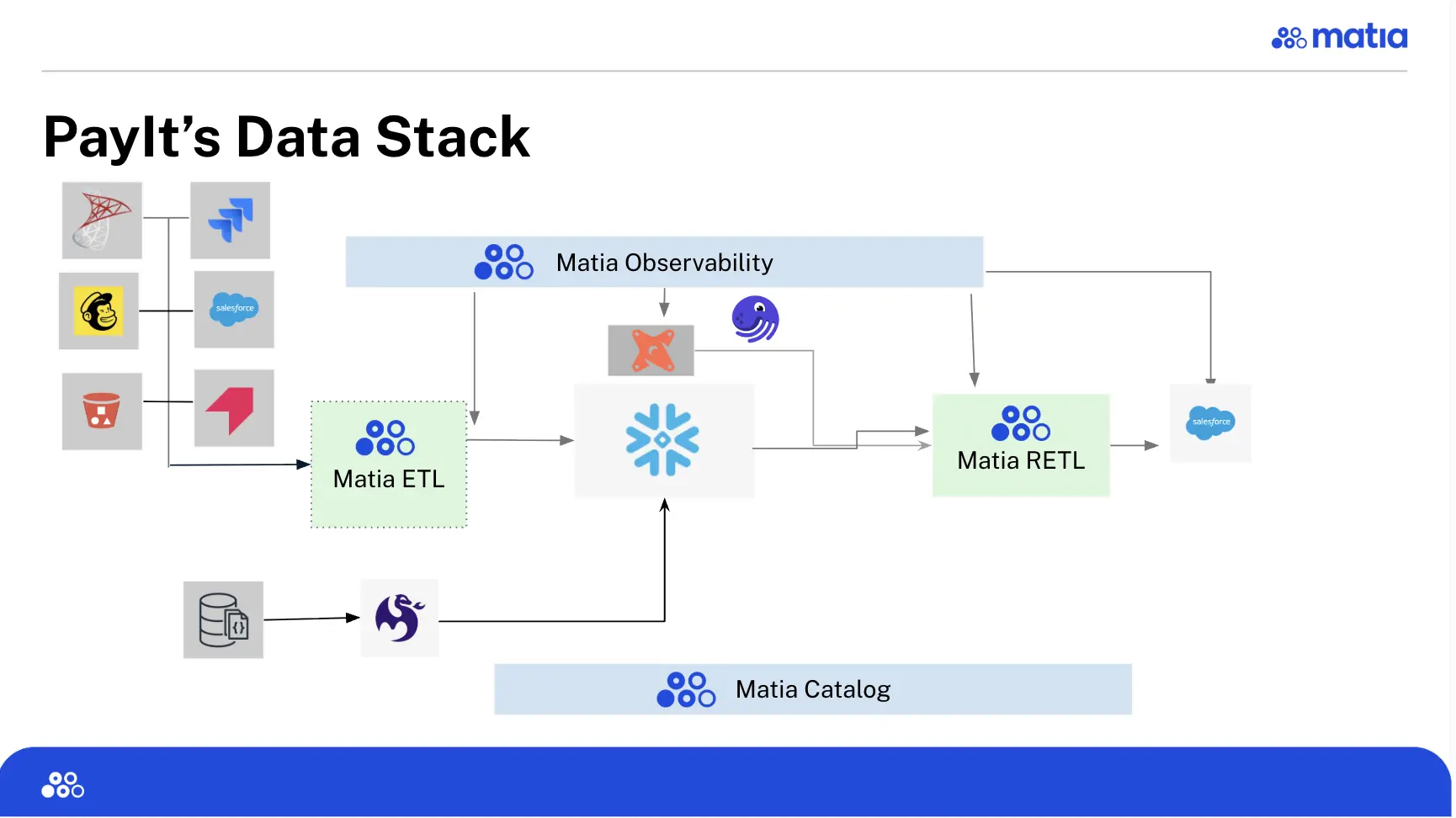
System 1: Meltano for Internal Platform Data
All internal platform data flows through Meltano, handling complex NoSQL data structures from PayIt's payment processing systems.
System 2: Matia for Third-Party Connectors and Reverse ETL
The second system handles all external integrations (ingestion/ETL) and data activation (reverse ETL):
ETL: Data Sources to Snowflake
The system ingests data from external sources into Snowflake:
- Salesforce
- Pendo
- SQL Server databases from the PayIt Outdoors acquisition
Reverse ETL: Snowflake to Operational Systems
The system activates data from Snowflake back to operational tools:
- Reverse ETL from Snowflake back to Salesforce
- Enriched customer data flowing to operational systems
The Migration: From Stored Procedures to Managed Pipelines
Before implementing this architecture, PayIt's third-party integrations ran on Fivetran with downstream transformations handled by stored procedures in Snowflake. Mitchell described several challenges with this approach:
Brittleness: Pipelines were hard to maintain and would break frequently
CDC Limitations: After migrating to Snowflake, the team needed better Change Data Capture capabilities.
Salesforce Formula Fields: Fivetran wasn't syncing Salesforce formula fields properly, which meant critical calculated values weren't available in the warehouse.
Technical Implementation: Setting Up Bidirectional Salesforce Sync
During the webinar, Mitchell walked through a live demo of setting up the Salesforce integration, demonstrating the full pipeline pattern: ingest from Salesforce → transform in Snowflake → activate back to Salesforce.
ETL: Salesforce to Snowflake
The setup process highlights several features Mitchell found valuable:
Environment Tagging: The ability to tag connections makes it easy to see which integrations are associated with each environment, like production.
Documentation: The built-in documentation on the right side of the interface was helpful for getting everything set up as a new user.
SQL Script Generation: As Mitchell demonstrated, "You can see as we're walking through here, each one of those creates a SQL statement, so you just have this super handy script that you can drop into Snowflake and run."
Bulk Selection: For databases with many tables, "This is incredibly handy, especially in some of our SQL Server things, where we have literally hundreds of tables."
Reverse ETL: Snowflake to Salesforce
The reverse ETL setup involves:
Data Source: A Snowflake table or view containing enriched customer data.
Mapping Strategy: Field mapping supports both auto-mapping and manual selection. As Mitchell showed, "You could do auto mapping, or you can come in and select any of these fields that you want that would make sense."
Sync Modes: The platform supports different sync modes, though the specific options depend on the destination system.
The One-Record Test Pattern
Mitchell highlighted this as one of the most valuable features:
"You can actually run a test here. And this will sync a single record from Snowflake up to Salesforce. And that, for me, has been really handy. You save it, you do a connection, it connects okay, but you don't know if it's actually working. So being able to do just one test of one single record to get that quick feedback is super helpful. I know in some other tools you have to sync entire data sets and who knows how long that takes. Just having that one single record test is an immense time saver."
Column-Level Lineage
Mitchell also demonstrated the observability features:
"Being able to expand on all these tables, all of the columns, seeing that lineage, really from beginning to end is a pretty awesome feature. You can click on any of those columns that are being moved through each of those steps, and it'll show you that connection there."
Performance and Reliability Improvements
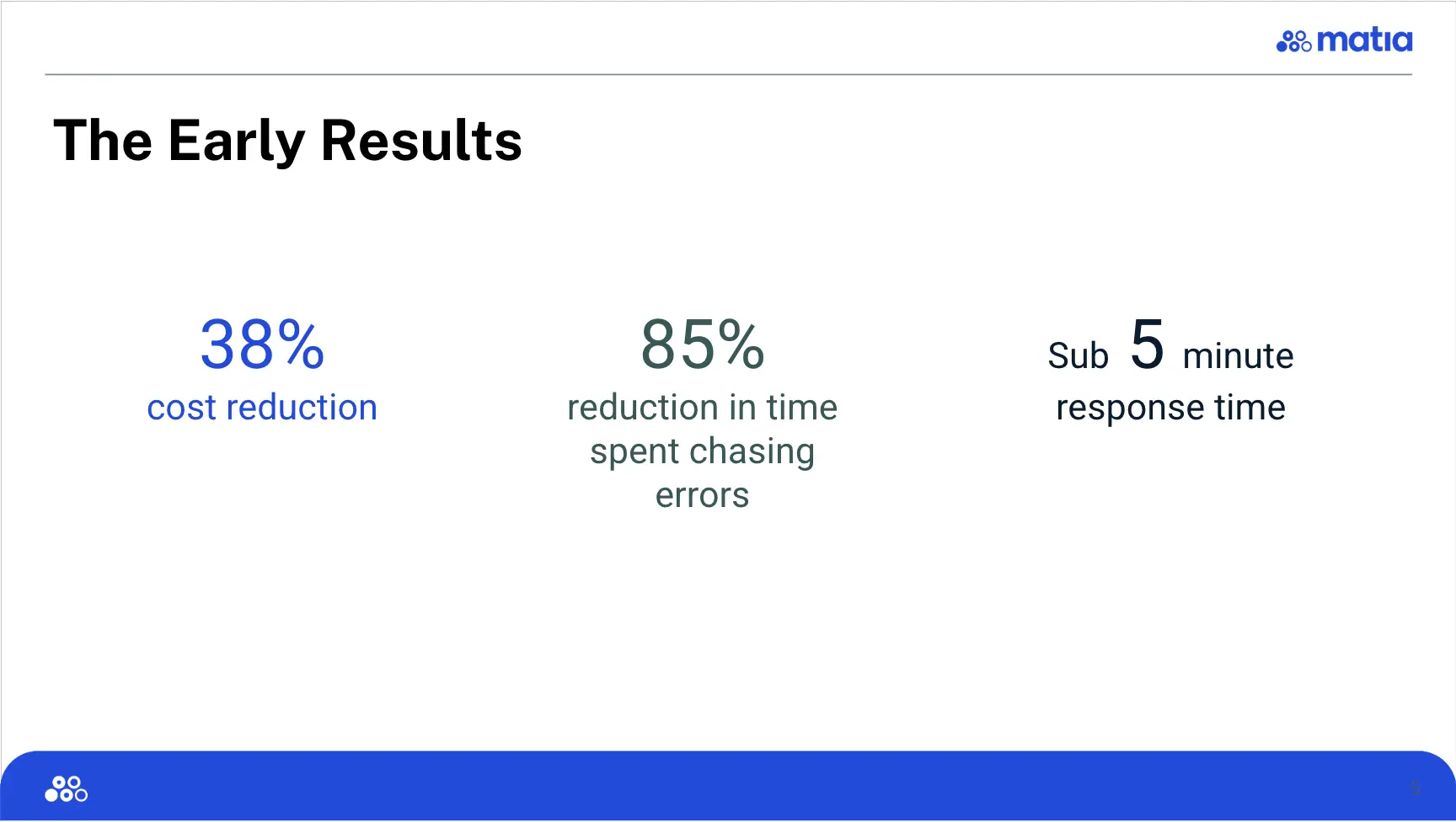
Mitchell shared some early results from the first month of running the new architecture:
After one month: 38% cost reduction, 85% reduction in time spent chasing errors, and sub-5 minute response time from the platform team.
Cost Efficiency
"In addition to being incredibly easy to set up, we've seen some cost savings. So about 38% cost reduction for us. So, you know, while the contract pricing that we paid is the same, we are getting so many more MAR with Matia than with Fivetran. And so that's pretty awesome. I know my boss loves that."
Mitchell also noted the elimination of surprise costs, controlling for extraneious variables.
Operational Overhead
"We've got less errors. I've gotten hardly any notifications that we have had any real issues pop up with Matia as opposed to Fivetran. And if I'm being completely honest, that 85% reduction in time spent chasing errors is indicative of how awesome Matia has been at being proactive with any issues that have arisen."
Mitchell explained the proactive support: "So we've definitely had issues, but by the time I get in and I'm looking at Matia they've already been resolved or I've already got a message telling me what the issue is and that they're already working on it. And so, for me, there's a lot of peace of mind knowing that I don't really have to do a lot of that work, that that's already being done. And I can focus my efforts on setting up or maintaining the other pipelines that we have."
Support Response Time
"I will be honest, I was a little skeptical when Matia told me that it was a sub-5 minute response time, but I can tell you it is accurate, which is truly impressive. And as a client, I really appreciate it."
"Matia has definitely made my life easier as a data engineer having to maintain these pipelines."
The webinar offered a practical look at how data teams can approach hybrid architectures when dealing with diverse data sources and operational requirements. Mitchell's willingness to share both the technical details and the actual results made this a valuable session for anyone managing similar complexity. View the full webinar here or at the top of this post.

.png)





.svg)


